
Choose your map
Switch between Blocks, Rings, Layers and a file list. Explore the maps in 2D or 3D and zoom into folders.
 SpaceMapDisk Space Analyzer
Optimize your disk
See what fills your disk and what changed since your last survey. Explore folders as a map, find the biggest changes and make room for what matters.
Windows 10 and 11 · x64 and ARM64 · Preview 0.1.0
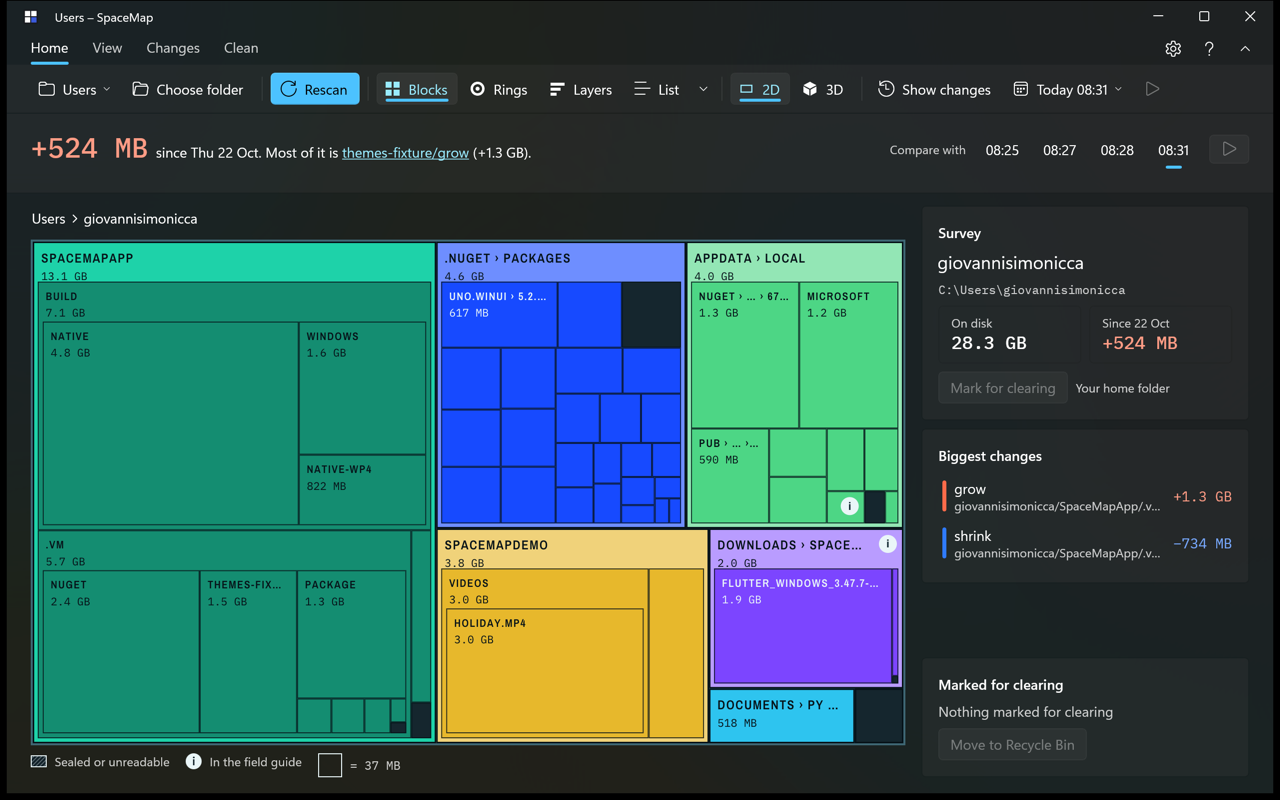
A survey of your storage
Start with a drive or folder, then explore the details.
Switch between Blocks, Rings, Layers and a file list. Explore the maps in 2D or 3D and zoom into folders.
Save surveys and compare them later. Find folders that grew or shrank and replay the changes on the map.
The Field guide explains familiar folders. Review what you mark for clearing before moving it to the Recycle Bin.
On your computer
Scans, surveys and the Field guide run on your device. SpaceMap does not upload your file names or scan results.
Read the privacy policy ↗Watch the map grow as files are found. Open a folder for a closer look, switch views or return to a previous survey.
Choose from six themes, including Paper, Night and Ocean.
Windows preview · 0.1.0
Windows 10 version 2004 or later, or Windows 11. Runtime files are included.
Portable preview · ZIP · 86.1 MB
Download X64 ↓Portable preview · ZIP · 82.5 MB
Download ARM64 ↓Download the ZIP for your PC, right-click it and choose Extract All. Open the extracted folder and run SpaceMap.exe. Keep all the files together. These preview executables are unsigned; Windows may show a publisher warning.
The Microsoft Store edition is being prepared. macOS and Android editions are in development.
SHA-256 download checksums ↗Questions or feedback?